Showing posts with label character concept. Show all posts

Monday, September 26, 2016

The Night Sky + A Watercolor Portrait (4/100)


I am extremely happy with the way today's canvas panel turned out. The colors turned out exactly the way I wanted them to, and circles have always been a bit of a signature motif for me. Because of that, plus the fact that the vision I had in my head actually came to life, I don't know if I could be happier. 

If you would like to purchase this piece, it can be found here.


  • Now we're moving on to a few of the detail shots. In the photo on the left, you can see one of my favorite bits of this little painting - the focal point. I was at the point where the piece was almost completely finished, but it just felt like it was lacking to me. I've really been enjoying playing with this color of paint and I thought I would try it out. I could always paint over it if it didn't work. I like to think that it did.
  • I used several different methods throughout this piece to attempt to tie the circles into the background, in addition to letting them stand out on their own. This included, but wasn't limited to, splattering white paint, stamping, watercolors and NuPastels. 
  • There was a good bit of collage in the background, a lot of which disappears completely, but I know it's there. If you look closely, you can see a few places where words show through and some black dots that were from a piece of patterned tissue paper.


  • I absolutely adore the texture in the first photo. The canvas texture shows through in some places and is completely covered in others. It's one of the things that I've really enjoyed about working on these canvases. 
  • Another part of this piece in particular that I adore are the bits of dots that were stamped over the piece. I feel like it helped to tie the piece together and gave a different size of circle for interest. In the long run, I feel like this piece does exactly what I wanted it to in the first place - shows the concept of a night sky.


I also mentioned the other day that I was still extremely interested in doing faces, and just because I had started a new project, I wasn't going to let creating new characters fall by the wayside. The other night, I was feeling in a watercolor kind of mood, and this girl was born! If you follow me on Instagram (@worldofimmensum), you may have seen progress shots of this portrait in my story.

Honestly, I adore the way she turned out. She feels like she's just screaming for a story, and I think she definitely would have a sword. I've been having a ton of ideas lately based on the art pieces I've created, and that's something that I absolutely adore. It's a big part of my reason for doing art in the first place - this blog is my development place for World of Immensum. I've really been enjoying this whole journey so much, and hope all of you agree with me as well.

Again, thank you all for visiting, and I look forward to hearing from you!

Sunday, September 18, 2016

Mixing Digital and Physical + A Sketchbook Page


Today the art I focused on doing was a lot more oriented towards drawing and not so much painting, but I suppose the first piece could technically be considered mixed media.

This is definitely one of my favorite things I've finished in a good long while, and I'm happy that I even managed to come up with the concept in the first place. It's definitely something I'm going to have to explore in the future. I scanned the page from my art journal I painted yesterday into my computer to start things off.

A big thing I wanted to do was make this painting feel more finished, so I opened the scan in Photoshop and used my drawing tablet to add solid black outlines. I love the way this turned out, and the lines from the composition paper showing through add a sort of subtle touch that I love.


The second thing I have to share with you all today was a age that I finished in my sketchbook (you can see the marker lines peeking through on the opposite page from this sketch) that I absolutely adore.

When I started this page, the only real idea I had in mind was the girl in the lower left hand of the page. I didn't even realize that I was going to give her a body (which is why the one side of her body is sort of falling off of the page), but I'm glad that I did in the long run. She's a character that I'd love to give a final version eventually. 

After I had given her a little bit of work, I started to develop other concepts and felt the need to put them down as well. After it was all said and done, an hour and a half had passed and this was the result. Sometimes a little bit of pointless sketching is great stress relief, and this was one of those instances.

In the long run, today was more of a time to recover from working four days with long hours in a row. I watched a couple of movies and got nice and inspired in that regard, and the ideas are slowly but surely starting to merge and work themselves out. 

Thank you all for joining me, and I hope you're all as excited to see what the next couple of days (that I have off) will hold!

Saturday, September 17, 2016

An Ocean Inspired Watercolor Face


Today's mixed media (but primarily watercolor) face is right up there with some of my favorite pieces I've done for the entire 29 Faces challenge. This is actually my 22nd face that I have completed, despite the fact that it's only the 17th of September (I'm a bit of an overachiever, if you haven't noticed), but I wanted to say that I probably will be continuing to create faces for the rest of the month, even after I hit 29. I've been having an extraordinary amount of fun with it, especially when I manage something that I love as much as this piece.

In the long run, I sort of wish that I had done this piece on a more legitimate surface, rather than a page in a composition notebook, and I don't think I'm going to give this girl any more of a background than she already has. However, I do like the lines peeking through in this piece, so in the end I suppose it all works out.


  • This piece was done in a composition book art journal, as previously stated, but I did decide to prep the surface with a thin later of white acrylic paint that I scraped onto it with a palette knife. The pages were slightly shiny and I wanted /something/ for the watercolor to adhere to, rather than sitting on the surface or sinking into the paper. 
  • As you can probably tell by the photographs, I incorporated a good bit of graphite into this piece. The entire idea for creating this face was to just play with watercolors. I didn't want to be too structured with it, but I didn't want to be too abstract either. I just wanted to have fun and try to curb some of the fear I have of watercolors. For the most part, I feel like I achieved that. 
  • The colors of this piece are honestly one of my favorite parts. The color of her hair originally sprung from trying to incorporate some blue into the actual tones of her skin, but it just sat on top of the face and seemed like it could be shaped into a hairline. I went with it. 


  •  Something you can also see in these photos was something I used on another of my favorite faces I've done, which is a gold marker by Studio G that I got at Michaels for something like $1.50. It writes smoothly on top of paint, and it adds a shine and highlight to the page that I utterly adore. Sometimes it just seems to be the perfect finishing touch.
  • Almost contrasting yesterday's face (though I like today's a lot better), the blue of her hair made me feel as though she could represent water. That was why I decided to go with such a freeflowing neckline for her shirt, almost letting it fade into waves. 
In the long run, it's days like these that make me excited to do challenges like this one - if I paint enough faces, a few are going to stand out as my favorites!

Thank you all for visiting, and I hope you like this girl as much as I do.

Saturday, September 10, 2016

Step-By-Step Digital Face (9.10.2016)

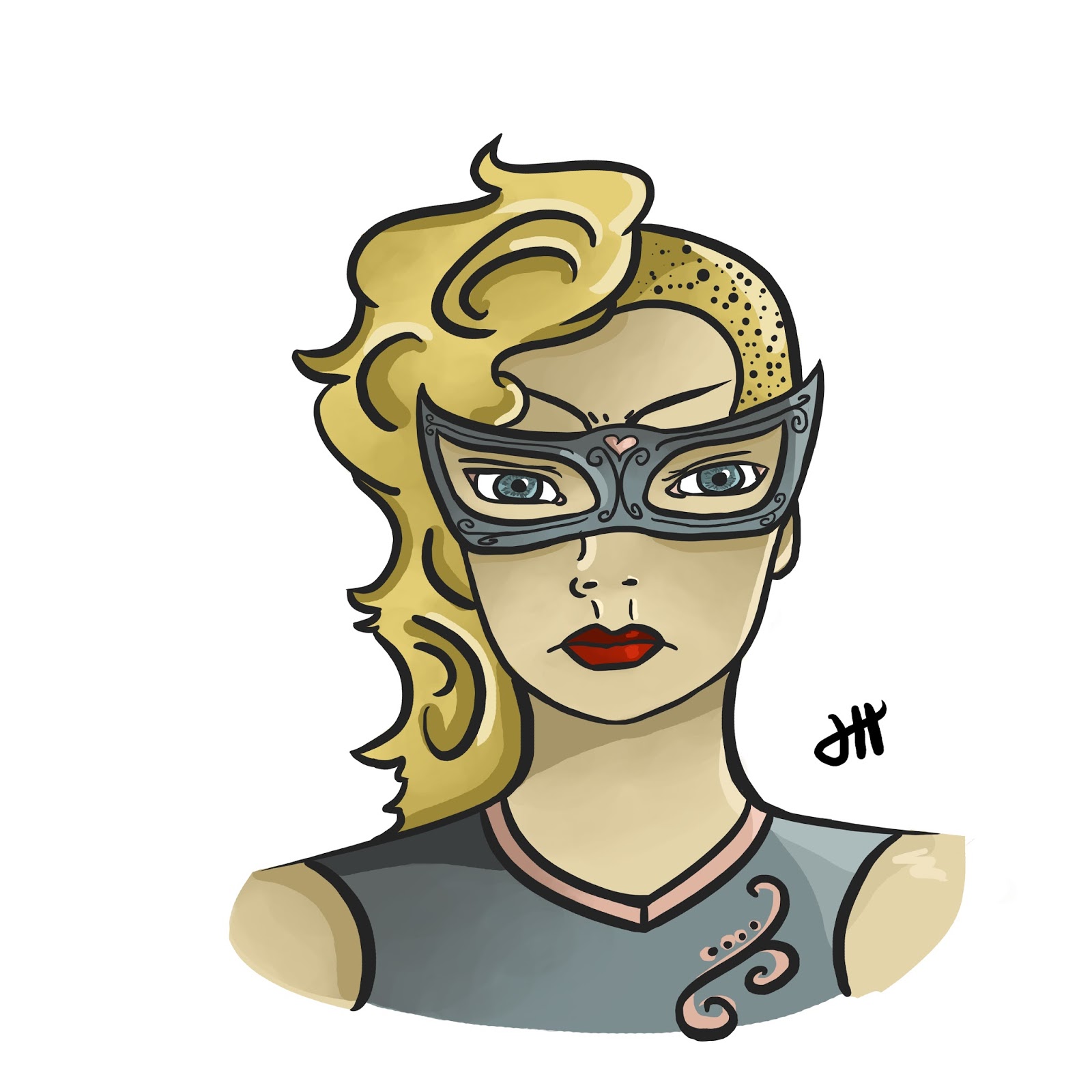
I haven't gotten around to doing any mixed media yet today (not that I won't later tonight), so I decided that I'd take a bit of a different approach to today's face for my 29 Faces. Today I made the decision that I wanted to do a bit of digital work in Photoshop, since I haven't used it in a little over a week, and I felt the urge starting to grow. 

I've also mentioned a couple of times that I was interested in doing some digital art for this challenge, and I finally found the time to do as I've been threatening! This piece in particular was done in Photoshop and took 2 hours and 20 minutes.

As you can probably guess if you've been following my 29 Faces journey, this face in particular was inspired by one of the first faces I drew for this challenge. I've been wanting to draw her digitally ever since that sketch appeared in my sketchbook, so I'm happy I was finally able to get around to it. She's always felt very superhero-esque to me, so I went for somewhat of a comic book style with this piece.

Now here's the kicker. Ever since I've started this challenge, I've never done a step-by-step or behind the scenes of any kind. However, I figured now was about the time to do so. I love the progression of digital art and the way it looks, so I typically take progress shots anyways. I figured I'd actually share them this time around.
  • As with most pieces of art, my digital art always starts with a rough sketch. This isn't perfect in any sense of the word, and it's solely intended to get ideas down onto the canvas. I typically work my digital sketches in layers, starting with a soft brush to work in large shapes, then I lower the opacity and start a new layer. 
  • On said new layer, I use a smaller soft brush to further define the sketch. This process of lightening the opacity and starting new layers continues until I move to a hard round brush, and the steps continue until I am happy enough with the layout of the sketch to start a serious outline.


  • The "serious outline" is what is depicted in the above screenshot. Essentially, I start a new layer, much as before. However, instead of being so rough and sketchy with the lines, I define them more - they are going to be my final lines, so I want them to look nice. 
  • I used to take a long time on the final outline layer, but I would get so caught up in making sure it was perfect that my pieces could take up to eight hours to complete. Now, I still can take that long to complete a piece, but those are typically full body pieces complete with backgrounds and sometimes several characters.
  • I like Photoshop's "Hard Round" brush for my final sketch because it gives a nice line variation in the thickness, but stays solid in color.


  •  The next step forward is to do a flat color. This is exactly what it sounds like, and it's fairly straightforward. At this stage in the process I don't worry at all about shading or a light source, or anything of the kind. Instead, this step is purely about making sure the color scheme I've chosen works well.
  • It's basically a coloring page at this point - I use a brush to work underneath of the outline layer, filling in color as I see fit. Here I am just making sure that everything works well together, as an overall whole. 
  • In order to avoid becoming repetitive (you can scroll up to the top to see the finished piece again) I've decided to show a photo of the finished piece printed out to show the final steps. I think it looks really nice like this. 
  • The final step is to add shading and highlights. I typically will start with choosing a light source, then adding in darker shadows with a hard round brush. Then a blend it in with a large brush that changes opacity as you press lighter on your tablet. This will add subtle shadows and shading.
  • In the case of this piece, I was going for more of comic book feel, so in addition to that step I also added some harder shadows (most notably underneath of the neck and the mask, as well as in the hair).
  • The final step, and my favorite, is to add highlights. These are reflections from the light source, and it takes a bit of practice to get the placement right (I still have some issues a lot of the time), but they add a ton of dimension that I adore.
Please keep in mind that this is only my process for creating art in Photoshop, and it was due to a lot of continuous practice and evolving of style. However, that being said, if anyone has a drawing tablet laying around that they haven't gotten the nerve to use and you end up being inspired to do so because of this post, I'd love to hear from you!

You can also see this face in my portfolio on my website here.

Thank you all for visiting, and I hope that you enjoyed this post and face as much as I do!